Chris Leong

Disoriented views from the rosy lens of an optimistic realist.

Category: Archives

DevTalk – Improving Software Quality

As promised here are the slides that I used in the presentation on how to improve software quality using Visual Studio Team System.

In this presentation, i have showcased how Code Analysis, Code Profiling, Loading Testing do wonders in helping you develop quality applications.


You can download my slides about Improving Software Quality. If you want to try out Visual Studio Team System 2008, try downloading the VSTS 2008 VPC.


Cheers

Import Gmail Contacts to Outlook 2007

My friend post a question to me about importing Gmail contacts to Outlook. It is actually quite simple to do it, here are some steps to do it.

1) In Gmail, click on contacts. Then select that contacts that you want to import.

Gmail Export

2) Click Export

Gmail Export Contacts

3) In the next screen, select Outlook CSV contacts

image

4) Next go to Outlook 2007. Click on File –> Import and Export

5) Select “Import from another file”

6) Select “Comma Separated Value (DOS)”

7) Follow the instructions and you should see your Gmail contacts in Outlook

Delete a project from Team Foundation Server

Deleting a project on Team Foundation Server is not that straight forward. Here’s how you can delete a team project

  1. Open the Visual Studio 2008 Command Prompt window.
  2. Change to the C:Program FilesMicrosoft Visual Studio 9.0Common7IDE directory. For example: cd "C:Program FilesMicrosoft Visual Studio 9.0Common7IDE"
  3. Run the TFSDeleteProject utility using the following command line. “TFSDeleteProject /server:YourServerName YourTeamProjectName”
  4. To confirm the deletion press Y and then press ENTER.

TFSDeleteProject utility then deletes the team project that you’ve selected

Visual Studio Flex Add On (Amethyst)

Received an email from Huw Collingbourne highlighting to me the availability of another Visual Studio Flex Add On.

For more information about this. Checkout the following sites:

In my previous post I’ve also blog about another add on

Check out the screenshots for the Amethyst add on

Flex Add On

Flex Add On

Microsoft Community Day – 13th Feb 2009

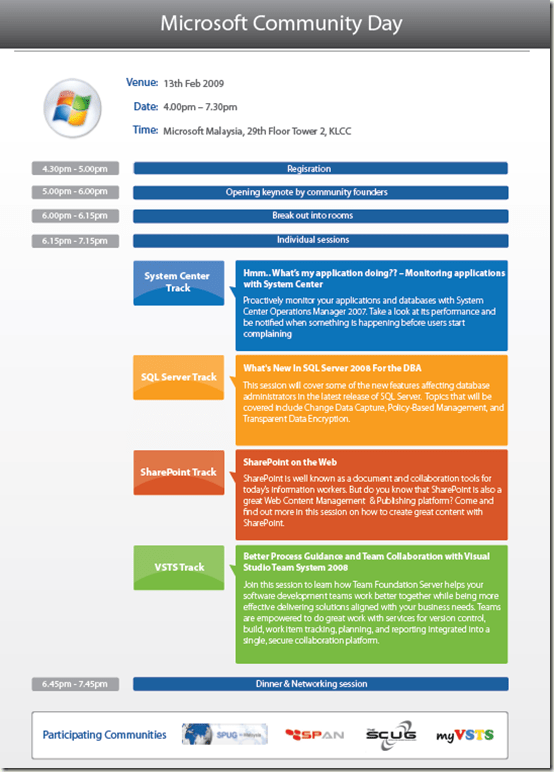
Microsoft User Groups is having a community day on the 13th February. They are lining up cool and exciting demos about Microsoft Sharepoint, Visual Studio Team System, System Center and Microsoft SQL server.

Do sign yourself up via Facebook

MicrosoftCommunityDay

GreatSummary – Online tool to summarize articles for free

I read a lot and i read a lot of various topics from politics, technologies, sports to any interesting reads. And like most techies, a big chunk of my reading is done online. With me doing my Masters, i need to read even more. So i always wish that there is a tool that i can use to summarize a long document to a few key points (Being a techie, naturally i rely on technology). My wish sort of come true, when i stumble upon this website call GreatSummary.

It provides a tool with some algorithm to summary an article to a few key points.

Some info from the site on how it works

How GreatSummary Works
GreatSummary uses a patent pending algorithm to identify the major topics in a document.


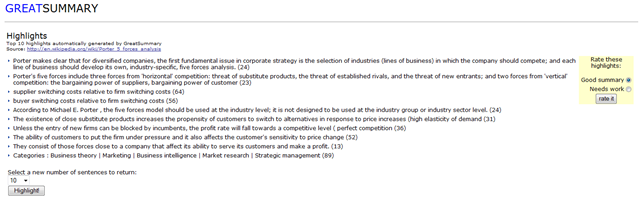
This is a summary how the highlights look like

GreatSummary Highlights

So I’ve tested it out, some sites it does works well. On some sites the outputs are not satisfactory. I guess i can’t be too demanding since it’s still on the beta stage. But give it a try, I find it useful to give me a preview of the document without dwelling too long into it.

Thanks to James Yeang who posted this tool in his blog.
Outlook Tips – Add a Second Time Zone

In my line of work, I do need to work with people from different time zones. Adding a different time zone can really helps to manage the time differences.

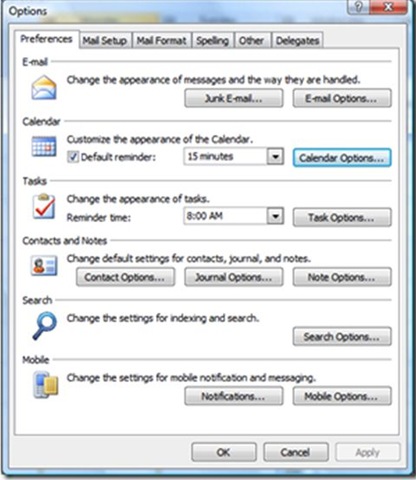
To add a new time zone. Go to Tools menu > click Options > Under Calendar . Calendar options

Outlook Timezones

Outlook Options

Under Advance options > Click Time Zone > select the Show an additional time zone check box. In the Label box, type a description such as “Houston”. In the time zone list, click the Time Zone and click “Ok”

Outlook Timezones

An additional time zone will appear next to your default time zone

2nd Timezone

I'm on HWM Magazine

It is the first time for me to have my “face” in a magazine. Being a person who prefers to stay out of all this, it took me a long time and much persuasion from friends to put my picture in the article. As they say, people attached credibility when they can put a face to what people write. So being a pragmatic person, just “la” do it lo
Chris Leong on HWM
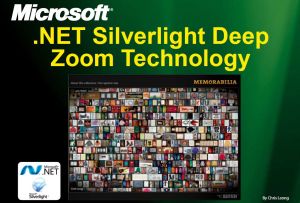
So this here’s my first article, about a Silverlight technogy with Deep Zoom feature. It allows you to zoom in to your pictures. 

You can download the softcopy here but the best way is. Buy a copy of HWM magazine; it features damn cool stuff about happenings in the IT world.
Here’s some links that you could checkout that I mentioned in the article

To view this, download Silverlight and here’s the softcopy of my Silverlight with DeepZoom article

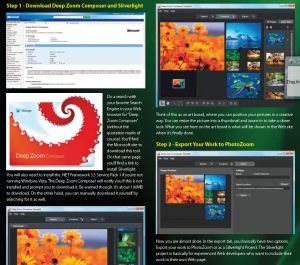
Here are some snapshots of my article.


DeepZoom Tech

DeepZoom Tech


Hardrock - Best example of DeepZoom Technoglogy

Hardrock - Best example of DeepZoom Technoglogy


Some steps on how to do DeepZoom

Some steps on how to do DeepZoom

Obama's Inauguration with Microsoft Technologies

Just read some articles that Obama’s inauguration will be stream using Microsoft’s Silverlight technology…

Silverlight has been chosen to stream U.S. President-elect Barack Obama’s swearing-in ceremony live on the Presidential Inaugural Committee’s Web site. Microsoft is also working with CNN using its Photosynth technology. Check it out @ Silverlight to Stream Obama’s Inauguration and Microsoft, CNN team up to make historians out of inaugural attendees

Watch Obama here @ http://www.pic2009.org/content/home/

Obama on Silverlight

Slides to Innovation Day Jan & TechNet MSDN summit

I know i have not been updating my slides lately. Its really a very hectic few weeks for me as I spend a lot of time finishing up my presentation for a big event – Technet MSDN.

It was really a “good” experience because its the first time in my life that i need to present to 360 -380 people. Here’s the link to my slides for both events

Innovation Day – Building Interactive Applications with Visual Studio 2008

Technet MSDN – WPF & Silverlight – Sharing Skills and Codes

For those of you who wants to have the demo that i use in Technet MSDN. Check out Scot Gu’s blog . I “borrowed” his sample =)