Chris Leong

Disoriented views from the rosy lens of an optimistic realist.

Tag: Technology

The new look of Facebook

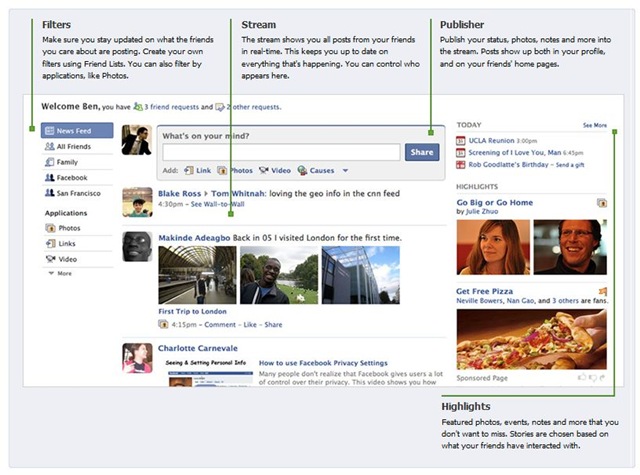
TechCrunch just showcase Facebook’s new look that will go live next week. Check it out here. Haven’t really gave much thoughts on whether i will like it. But I’m sure i will be hearing some feedbacks from the hardcore Facebook users.

But one interesting change that i find useful would be the friends limit. Facebook has just remove the maximum 5000 friends limit. (Not that i have 5000 friends in my account).

You can also check out for more information directly from Facebook

Facebook New Look


More screen shots here

Updates for Windows 7 Client Beta

Win7

Windows 7 Beta users. Just found out there are some updates that you need to install manually. Install this update to resolve issues with non-compatible applications for Windows 7 Beta.

Get it here Update for Windows 7 Client Beta (KB967062)

Twitter with Blu Powered by WPF

Just fell in love with this Twitter tool (blu) that is powered by Windows Presentation Foundation(WPF). It leverages on the goodness that WPF brings like great graphics, cool animations and a kick ass user interfaces. Check it out blu.
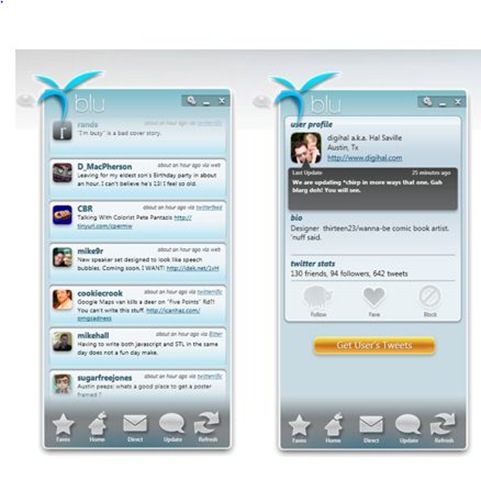
blu twitter tool

It offers many cool features but there is one feature that really makes my life easier in twittering. TinyUrl Integration, this feature is a real time saver. I just need to paste my link to blu and it will convert the link to a TinyUrl. 🙂

Here’s some info about blu’s features from their site

Unlimited tweets
With blu you can view unlimited tweets. Just keep scrolling and more tweets will be loaded and displayed automatically.

See the full conversation
Here’s another great feature in blu. You get a tweet, but it’s a reply to something you said earlier and you can’t quite remember what it was you said.

Usually, there isn’t a good way to see the first part of your conversation, but with blu, simply click on the arrow before the username and voila! Your tweet will flip in-place revealing the first part of your conversation.

Tiny url integration
That’s right. We’ve added tiny url support. Simply type or paste a link into the update bubble and blu will convert it for you. No extra buttons, no extra box.

Want to expand your link? Just click the ‘plus’ icon and blu will roll-back to the full url.
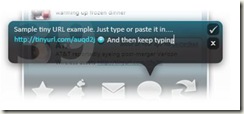
 blu intergates with tinyurl

Choose your favorites
We know you follow a lot of people, but perhaps you follow some individuals a little more enthusiastically than others. blu hears you!

Once you’ve defined your favorite tweeters with ‘Faves’, you’ll be notified whenever your favorite people tweet.


P.S

Another example of how great user experience matters. Check out how to program in WPF in its official site
Windows Mobile 6.5 Officially Announced

Microsoft just announce Windows Mobile. I have copied some of the comments from a post in Channel 10.

The New Look of 6.5

The Windows Mobile 6.5 software features a brand-new home screen with improved touchscreen interface. The interface resembles a “honeycomb” with hexagonal tiles for each program – a UI that promises to be more “finger friendly.” The 6.5 software allows for “fat finger touching” on a resistive touch screen so you can make more precise touches without need of a stylus.

The new interface also lets you go directly to your voicemail, text messages, and email, right from the Lock Screen:

My Phone

As for the services shipping with Windows Mobile, the free My Phone service lets you manage and backup your personal info from your device to a password-protected web service. This makes upgrading from phone to phone easier since data can easily be restored from web to phone.  The service also provides a portal where mobile content – like personal photos – can be shared with others. My Phone is currently an invitation-only beta.